Appearance
Your data on-chain
This page states what Stasho stores about you, what's encrypted, what's public, what a delete removes, and what you can check yourself.
Prerequisite: none, but Connect & sign in explains the keys involved.
Prompt for your agent
Copy this into Claude Code, Cursor or any agent that can run shell commands. What's public on this page is checkable from the network; the agent needs your address and nothing else. What Stasho's service keeps is not.
text
Read https://docs.stasho.xyz/guides/your-data.md and check my address
<address>. Call GET https://api.stasho.xyz/api/audit/<address> and tell me: every on-chain
signer currently authorized under my wallet (the Stasho delegate, session keys, agent signing
keys) and what each may write, whether any warning reports a cache-versus-chain discrepancy
(the CACHE_HAS_… and DELEGATE_WRITE_MISSING… codes) or a …TRUNCATED warning makes that check
partial, and every warning in full. Then confirm from the page which fields are
encrypted and which are public. Never ask for my wallet key; this check needs none.
The model in one paragraph
Your project and deployment records are written to a public network under your wallet address. Sensitive fields are stored encrypted; anyone can read the public ones. Stasho can access the encrypted fields: its service uses them to build and run your project and keeps an encrypted working copy, and Stasho holds the key to that copy.


What's encrypted, what's public
Projects:
| Encrypted | Public |
|---|---|
| Project name | Framework |
| Repo URL and branch | Deploy target |
| Build command, output directory | Created / updated timestamps |
| Environment variables | Deleted flag |
| GitHub installation ID | Custom domains |
| Default subdomain (by default a slug of the project's name) |
Deployments:
| Encrypted | Public |
|---|---|
| Commit hash and message | Status (queued, live, failed…) |
| Branch | Artifact CID |
| GitHub Actions run URL | Gateway URL |
| Build error output | Timestamps |
Note what this means: an observer of the network can see that your wallet deploys something and when, but not what it's called, unless a domain or a default subdomain gives it away, which repo it comes from, or what broke when a build failed. Source details are encrypted even for public repos.
Who can decrypt
On the network, each field written today is sealed to two keys, both yours:
- Your wallet key — the recovery path. With your private key you can open these fields without Stasho's service. On an email sign-in that key is held through Privy, so getting it depends on Privy (see Recover your data).
- Your browser's derived encryption key — the everyday path, derived from the one-time Unlock signature.
Stasho's service is not one of those keys. It handles these fields to build and run your project and keeps a working copy encrypted at rest. Stasho holds the key to that copy, so Stasho can read it. Deleting a project removes its deployment records from that copy (see below).
An agent key is not a recipient either. A key acts as you for the writes its scopes allow, on the project kinds each scope covers, and it reads what is public about them; every encrypted field above stays sealed to the two recipients, so an agent cannot read your project names, repo details, build output or environment variables, and the name it gives a site it creates is written encrypted by the Stasho delegate and echoed to it once, in the create response. An agent signing key signs your site records with the agent's own key on the public network; it holds no decryption key, and environment variables stay yours whatever a key's scopes say. An agent key itself is not on-chain: it shows in the dashboard's Agent keys list, and the audit endpoint's signer list shows only the delegate or the signing key that writes for it; its delegate log names the key id beside each write made with it.
Where our service runs
Stasho's service runs on confidential servers, which protects it from the hosting provider.
What happens when you delete a project
- The project is marked deleted on the network. The record stays, marked deleted.
- Stasho asks the network to drop the project's pinned files. The storage nodes usually drop them within a day or two. If that request fails, the files stay and keep using credits. Nothing retries it automatically yet, so ask us.
- Stasho removes the project's deployment records from its service. When it could not confirm the network dropped a deployment's files, it keeps that deployment's identifiers, which are public on the network.
Copies in Stasho's encrypted backups rotate out within 12 months.
IPFS is a public network. While your site was live, third-party gateways and nodes outside the storage network's control may have copied the bytes, and a FORGET doesn't reach them. Treat anything you deploy as public the moment it goes live — deletion removes it from the storage network, not from the internet's memory. Encrypted fields stay on the network as ciphertext.
Check our claims
You can check these yourself:
- Settings → Data & Privacy in the app shows the encrypted-vs-public field list, your on-chain message footprint, and any inconsistencies between our cache and the chain.
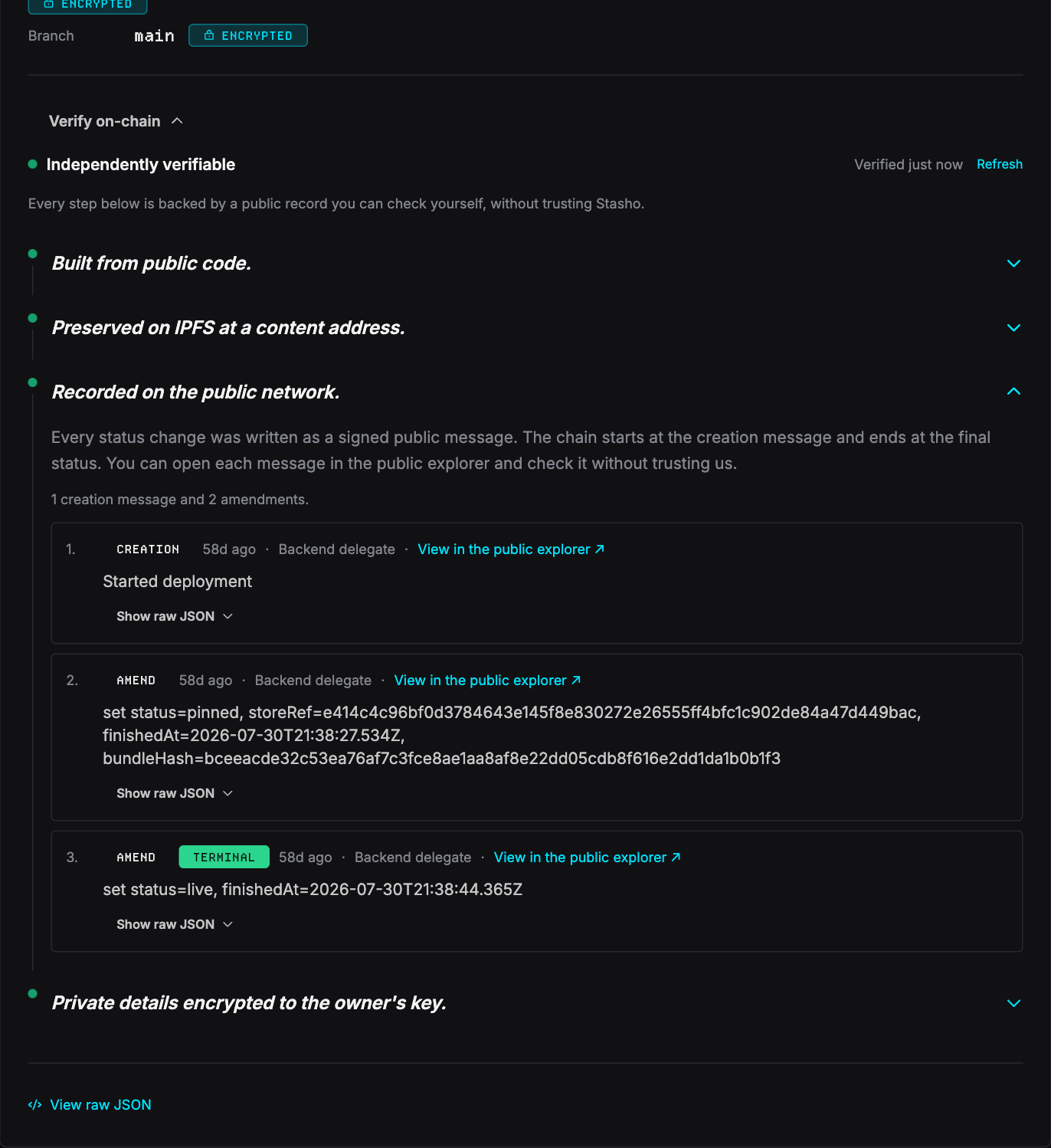
- Verify on-chain, on any deployment's detail page, walks the actual signed messages behind it — who signed each one (you, your browser's session key, or our delegate), with explorer links.
- The public audit endpoint —
https://api.stasho.xyz/api/audit/<your-address>— returns, unauthenticated, every key authorized to write under your wallet and whether our cache matches the chain.
- The recovery script, on request during the alpha, reconstructs your records from the public network directly.
- The GitHub App's permissions are listed in What the App can do: each permission we request and what we use it for, checkable against GitHub's own listing.
Related
- Your App VM: the same public-vs-encrypted model, applied to a server app running on the App VM Stasho runs for you
- Keys & authorizations — the keys that can write under your wallet, and how to revoke them
- Storage schema — the exact wire format, for tool-builders